KAST Fiat: USD Deposits and Worldwide Payouts
KAST Fiat lets eligible users receive USD bank transfers and send money through supported payout routes. “Worldwide” means broad international coverage with country, bank and account restrictions — not every destination. Incoming USD account details and outgoing payouts are separate features.
7 min read · checked against official sources 13 October 2026- $2 / $15 / $30–35Receiving fee: ACH / Fedwire / SWIFT (SWIFT disputed) [4][5]
- PausedJOD & JPY (from 2 Oct) and MXN payouts [8][9]
- UnavailableGlobal outbound SWIFT, per activation guide [3]
- Not guaranteedUSD account approval, even on paid tiers [2][1]
Who can use it, and how do you activate USD details?
Standard, Premium and Private cost $0, $1,000 and $10,000 a year. The cited personal pricing does not establish a general fiat fee discount for paid members, and a paid membership does not guarantee USD account approval or a supported payout corridor. [1][2]
- Complete KAST account verification. Open Receive → USD bank transfer.
- Accept the account terms and finish any further identity checks requested.
- Wait until the account is Active and receiving details are available. Pending approval is not permission to send funds.
- Choose the US-only or international receiving option offered in your app, then copy the details for the correct transfer rail.
Do not use your 16-digit card number to receive bank payments. USD Virtual Account approval is separate from general KAST verification, and availability depends on region and compliance checks. The activation guide gives inconsistent timings (instant, a few minutes, 24–48 hours); no fixed approval time is promised. [2][3]
Official guides: How Much Do KAST Memberships Cost and What Fees Should I Expect? · USD Virtual Account: Availability, Requirements · How Do I Activate My USD Account in KAST?
How do you receive USD by bank transfer?
| Rail | Best suited to | KAST receiving fee | Typical arrival |
|---|---|---|---|
| ACH | US domestic | $2 | 1–3 business days |
| Fedwire | US domestic wire | $15 | Same business day before cutoff |
| SWIFT | International USD | $30 or $35 (disputed) | 1–5 business days |
The fee schedule updated 12 October lists $30 for SWIFT deposits; the receiving guide lists $35. The receiving guide also states $10,000 per transfer and $20,000 a month, while the newer schedule says no fixed USD deposit limit. Neither establishes your personal limit — confirm with Concierge before a large transfer. Sending and intermediary banks can also deduct charges. [5][4]
Step-by-step: receiving a transfer
- Share the beneficiary and bank details exactly as displayed. ACH needs routing and account numbers; Fedwire needs wire routing details; SWIFT needs the displayed BIC and any required bank address or reference.
- Ask the sender to use USD and the correct rail. A mismatched rail, name or currency can delay or return a deposit.
- Check your transaction history for settlement. Banking cutoffs, weekends and compliance review can extend the timeline.
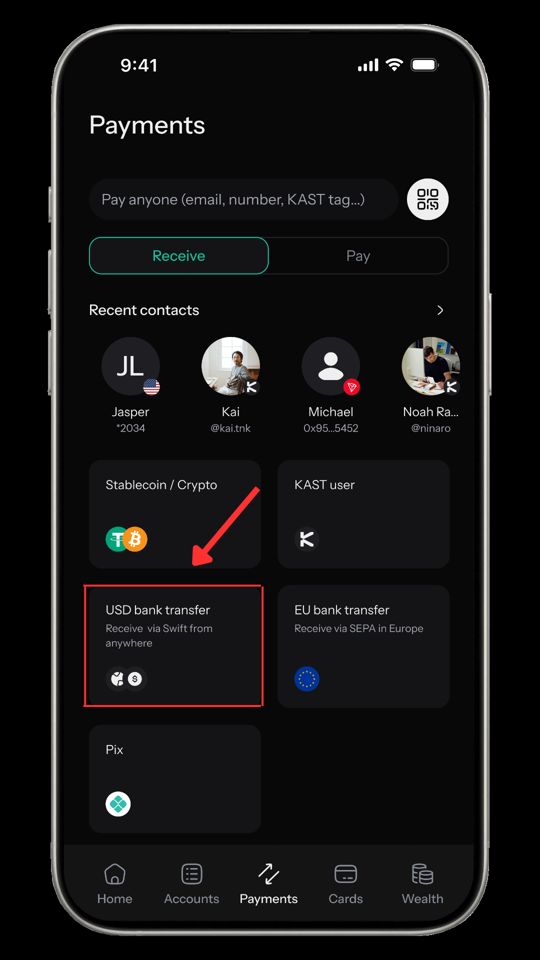
Official guides: How Do I Receive USD Into My KAST Account (ACH vs Fedwire vs SWIFT)? · What Are the Fees and Conditions for KAST Cards and Accounts?
How do you send to a local bank account?
| Payout | Published fee |
|---|---|
| AUD | $4 + 1% FX |
| CAD | $1.50 + 1% FX |
| GBP | $2–$3 + 1% FX (by provider) |
| Local USD | $1 ACH or $15 wire, + 0.08% where applicable |
Step-by-step: sending a payout
- If money is in Reserve, move it to your USD balance first.
- Open Pay → New Payment → Instant Payout, where available. For your own bank account, choose Transfer to your own account.
- Choose the currency, enter the amount and supply the required local bank details. For another recipient, use the corridor-specific options in the app.
- Review the fee, FX rate, minimum, recipient amount and delivery estimate before confirming.
- Save the reference and track the payout in Transaction History. Confirmed payouts cannot be cancelled.
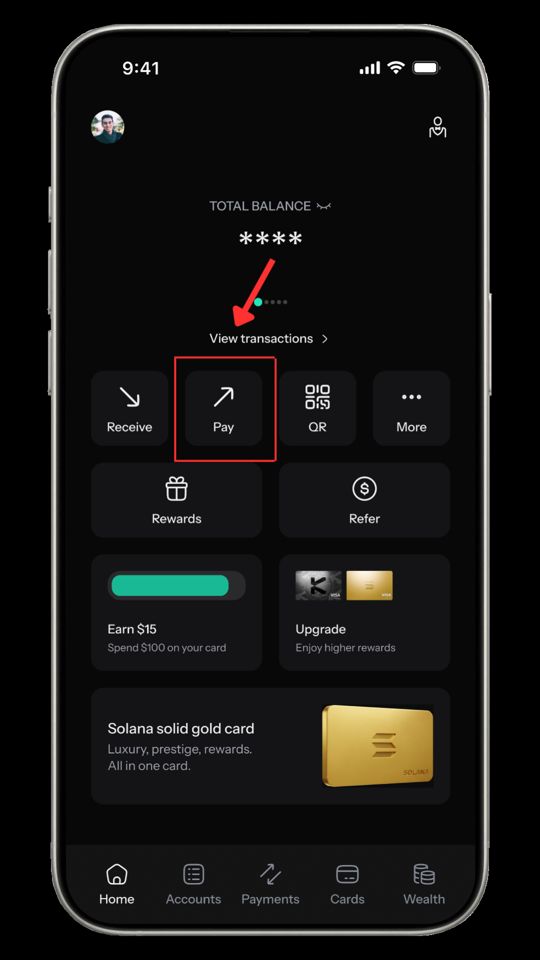
Official guides: How Can I Cash Out My Stablecoins from KAST to My Local Bank Account? · How Do I Move Money Into and Out of My Reserve Account? · What Are the Fees and Conditions for KAST Cards and Accounts?
Which routes are paused, and what if a transfer is delayed?
As checked on 13 October 2026: JOD and JPY payouts have a pause notice effective 2 October; its one-to-two-week restoration estimate is not confirmation that service resumed. MXN deposits and withdrawals have a pause notice with no restoration estimate (titled “MNX”, body says MXN) — do not rely on the zero-fee SPEI entry. The USD activation guide says global SWIFT payouts are temporarily unavailable, though fee tables still price them. [8][9][3]
If a deposit or payout is delayed, check the transaction status and quoted delivery window first. If it has passed, contact in-app Concierge with the transfer reference, date, amount, currency, bank, recipient country and error message. For incoming funds, obtain the sender’s bank receipt. Share account evidence only through official support channels. [4][6]
Official guides: JOD and JPY Payouts are Temporarily Unavailable · MNX Deposits & Withdrawals — Temporary Pause · How Do I Activate My USD Account in KAST? · How Do I Receive USD Into My KAST Account (ACH vs Fedwire vs SWIFT)? · How Can I Cash Out My Stablecoins from KAST to My Local Bank Account?
Items requiring confirmation
What has not been verified?
Complete live destination coverage, all recipient types, your provider, personal transfer limits and actual fees. No in-app transaction was performed. Review the quote and confirm the corridor before moving funds.
Which official discrepancies remain?
Incoming SWIFT $30 versus $35; USD deposit caps versus no fixed limit; outgoing ACH $1 versus $2; SEPA 1% FX versus zero; priced SWIFT routes versus a suspension notice. The newer schedule is a pricing reference, not evidence a suspended route resumed.
Can I use these screenshots?
Image reuse permission is unverified. Attribution does not establish a republication licence; confirm permission with KAST before public distribution.
More KAST guides
Sources & methodology
All primary sources are official KAST Concierge help articles accessed 13 October 2026; additional KAST pages are cited by the shared calculators. Calculations are MoneyQuest arithmetic from published figures. App screens and terms can change. Embedded KAST screenshots are attributed; reuse permission is unverified.
- KAST Concierge — How Much Do KAST Memberships Cost and What Fees Should I Expect? (updated 2026-09-10)
- KAST Concierge — USD Virtual Account: Availability, Requirements (updated 2026-08-31)
- KAST Concierge — How Do I Activate My USD Account in KAST? (updated 2026-08-09)
- KAST Concierge — How Do I Receive USD Into My KAST Account (ACH vs Fedwire vs SWIFT)? (updated 2026-09-14)
- KAST Concierge — What Are the Fees and Conditions for KAST Cards and Accounts? (updated 2026-10-12)
- KAST Concierge — How Can I Cash Out My Stablecoins from KAST to My Local Bank Account? (updated 2026-09-22)
- KAST Concierge — How Do I Move Money Into and Out of My Reserve Account? (updated 2026-08-19)
- KAST Concierge — JOD and JPY Payouts are Temporarily Unavailable (updated 2026-10-02)
- KAST Concierge — MNX Deposits & Withdrawals — Temporary Pause (updated 2026-10-13)
- KAST — Is the Card Available in My Country?
- KAST — Supported Tokens and Blockchains
- KAST — Terms and Conditions of Service
- KAST — Non-US Cardholder Agreement
- KAST — US Cardholder Agreement
- KAST — How Cashback Rewards Work
- KAST — Reserve (personal Reserve rewards page, reviewed 13 October 2026)
- KAST — USD Reserve Account Terms (effective 20 August 2026)